The best Loom alternative for Mac
If you used the link, pick another cloud tool. If you fought the 5-minute cap to make a video, pick a recorder with an editor. Options for each.
Updated October 8, 2026
The right Loom alternative on a Mac depends on which half of Loom you used. If you used the link, you want another tool that uploads as you record. If you used Loom to make a video file and then fought the 5-minute limit to get it, you want a recorder with an editor, and you probably do not need the cloud at all.
Most people who search for an alternative are in the second group. They record demos, tutorials and walkthroughs that end up on YouTube, in a help center, or in an email to a customer.
Everything below about other tools was checked against their own pricing pages on September 15, 2026.
Why Mac users look for something else
Loom's free Starter plan limits screen recordings to 5 minutes and caps you at 25 videos. The pricing page lists trimming, stitching and downloads under the Business plan at $18 per user per month, with Loom branding on the viewer page unless you pay.
That adds up to 4 common reasons to leave:
- The 5-minute cap. A real product walkthrough is rarely under 5 minutes.
- No file on the free plan. A link works in Slack. It does not work as a YouTube upload.
- Per-user billing. A team of 6 pays for 6 seats every month.
- Your screen on someone else's server. A recording of a dashboard shows whatever the dashboard shows, customer data included.
None of those matter if your recordings are quick replies to colleagues. For that, Loom is very good and you can stop reading.
The short version
| If you used Loom for | Try | Price model |
|---|---|---|
| Demos, tutorials, videos you publish | Screen Records | One-time, $29 |
| Instant share links, open source | Cap | Free for personal use, paid for work |
| Share links plus automatic zoom and polish | Screen Studio | Subscription |
| A quick private clip | ⇧⌘5 | Free, built in |
Screen Records
For people who used Loom to make a video, not a message. Ours, so read with that in mind. There is a full Screen Records vs Loom comparison if you want the long version.
Screen Records records to your Mac and opens the project in an editor when you stop. No length limit and no video count. What Loom makes you pay for, you get as part of the editor: split at the playhead, delete the mistake, add a zoom span on the button that matters, re-record one sentence with hold-to-narrate.
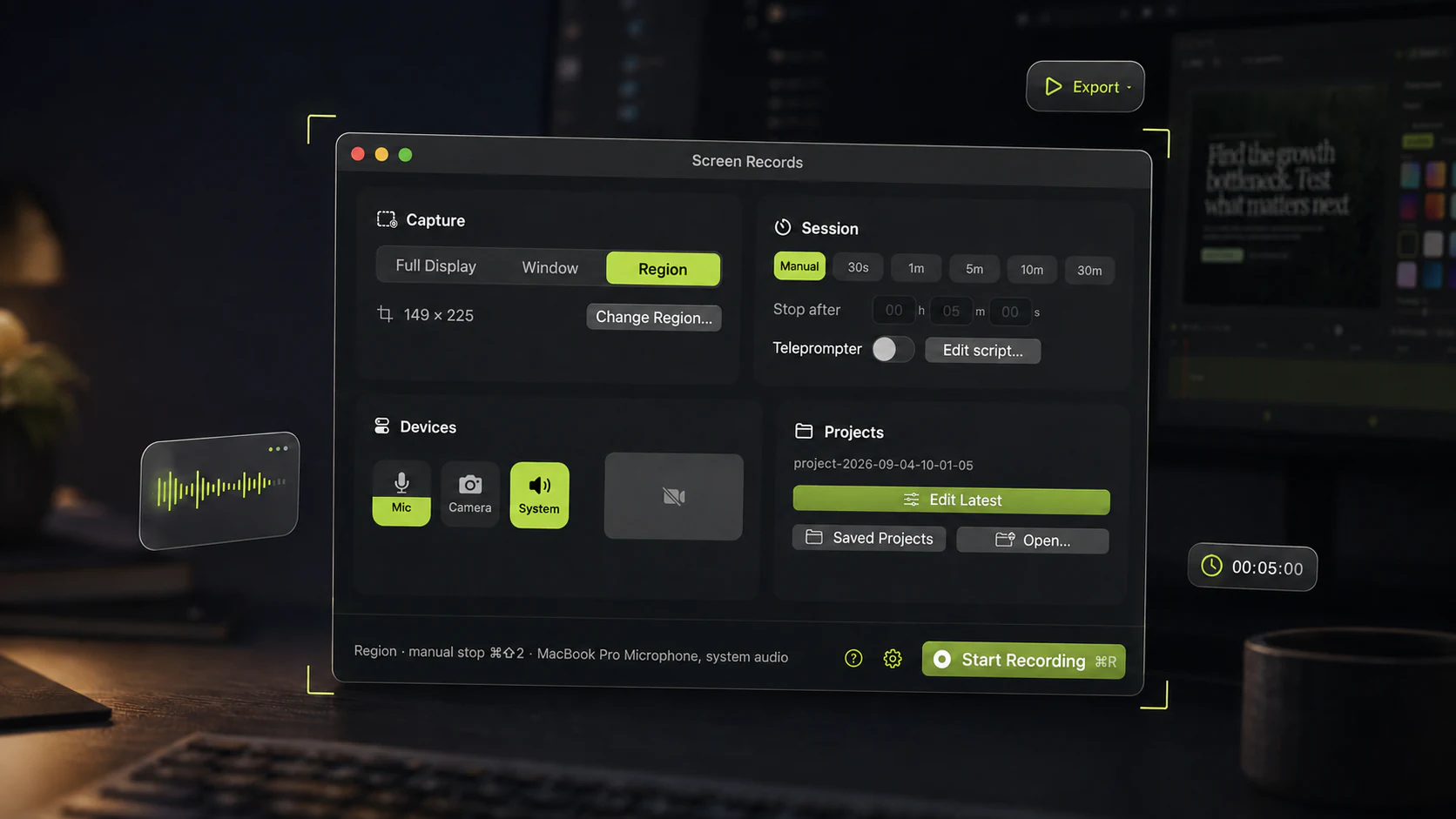
The camera bubble works the way Loom users expect, with more control: pick the shape, blur the background on-device, move it after recording. Controls stay visible across every Space and full-screen app, so you can pause or stop from inside whatever you are demoing.
Export an MP4 at the aspect ratio you need, or just the audio. Then share it however you like: YouTube, Google Drive, a help center upload, an email attachment.
What you give up: the instant link, view analytics, and comments on the timeline. Screen Records makes a file, and sharing is up to you. It is also Mac only, so it will not replace Loom for a team where half the people use Windows.
It is free to use with no account, and free exports carry a small badge in a corner. $29 once for one Mac removes it.
Cap
For people who used the link and want to keep it. Cap is the closest thing to Loom on this list. It is open source, runs on Mac and Windows, and uploads recordings as shareable links.
Its free plan covers personal use, with unlimited local recordings and share links up to 5 minutes each. Commercial use and longer links need a paid plan. If your team wants to host it themselves, the open-source code makes that possible.
Screen Studio
For people who want share links and the video polished for them. Screen Studio is a Mac app that zooms toward cursor activity automatically, smooths cursor movement, and offers shareable links. It asks for fewer decisions than a manual editor.
It is a subscription, and the zooms follow your cursor unless you correct them. Details and current prices are in Screen Records vs Screen Studio.
The built-in ⇧⌘5 toolbar
For people who used Loom's free plan for 30-second clips. Press ⇧⌘5, record a region, drag the file into Slack. No account, nothing uploaded, no cap.
It records your microphone but not your Mac's sound, and it can only trim the ends. For anything longer than a quick clip, QuickTime's limits show up fast.
Moving off Loom
Before you cancel, download the videos you still need. Loom's pricing page lists downloads on paid plans, so do it while your plan is still active. Every link you shared depends on your Loom account, so replace the important ones first: onboarding videos, help center embeds, the demo in your sales deck.
Then record the next one in whatever you picked, and pay attention to the minutes after you press stop. That is where the difference between these tools shows up.
Share this post
Keep reading
- ComparisonThe best demo recording tool for solo buildersYou are the whole production team, so the edit has to happen in the same window as the recording. Sorted by the four things solo builders actually record.
- ComparisonQuickTime screen recording: what it can and cannot doQuickTime is free and already installed. Here is exactly where it stops — system audio, zoom, trimming — and what to do about it.
- GuidePause a screen recording instead of editing it outThe door, the slow build, the notes you lost the thread of. Pausing keeps that time out of the file entirely, so there is nothing to cut afterwards.