Record what you ship.
Make a product demo or tutorial on your Mac, fix the rough parts in the built-in editor, and export a video ready to share. Your AI assistant can help edit it, too.
Native Mac app · projects stay on your Mac · paid once, no subscription
macOS 14.0+ · Apple Silicon and Intel · signed & notarized · 5.3 MB download · v0.1.7, Oct 9
Rough take → finished dynamic video
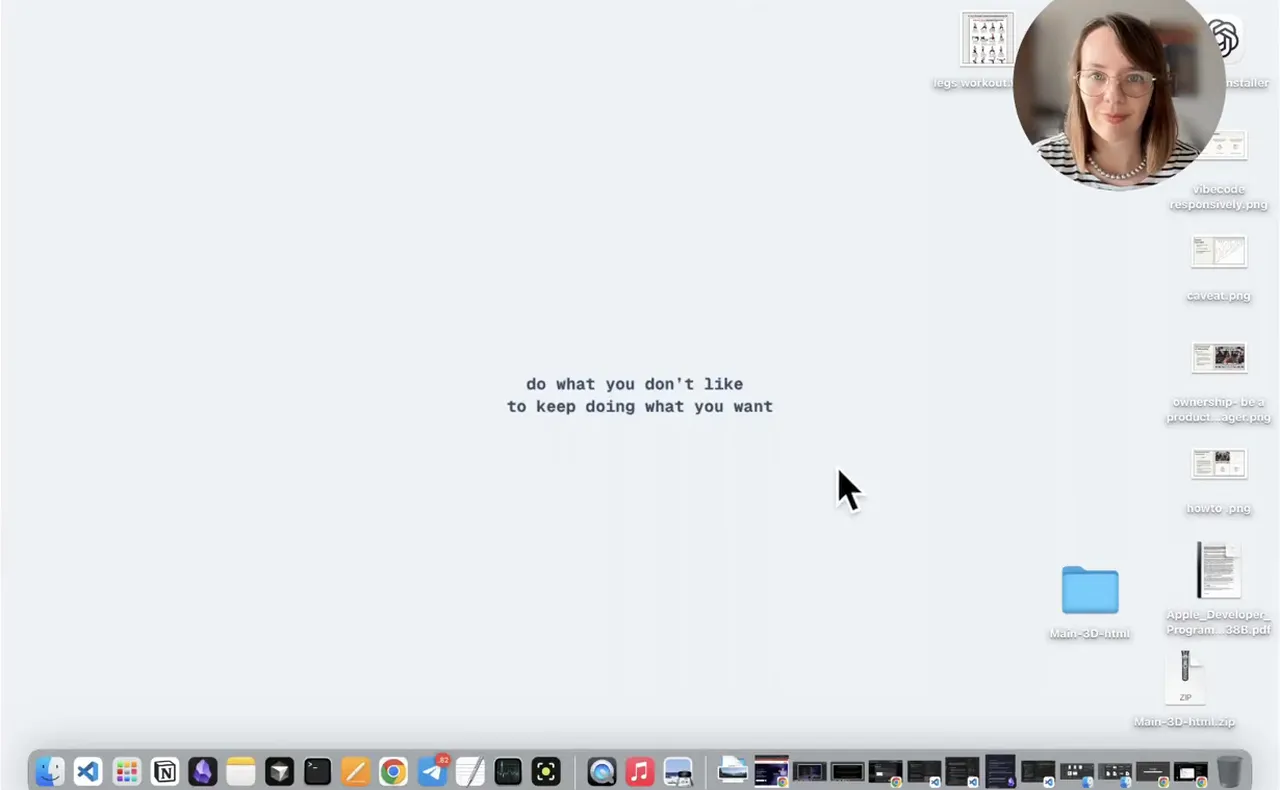
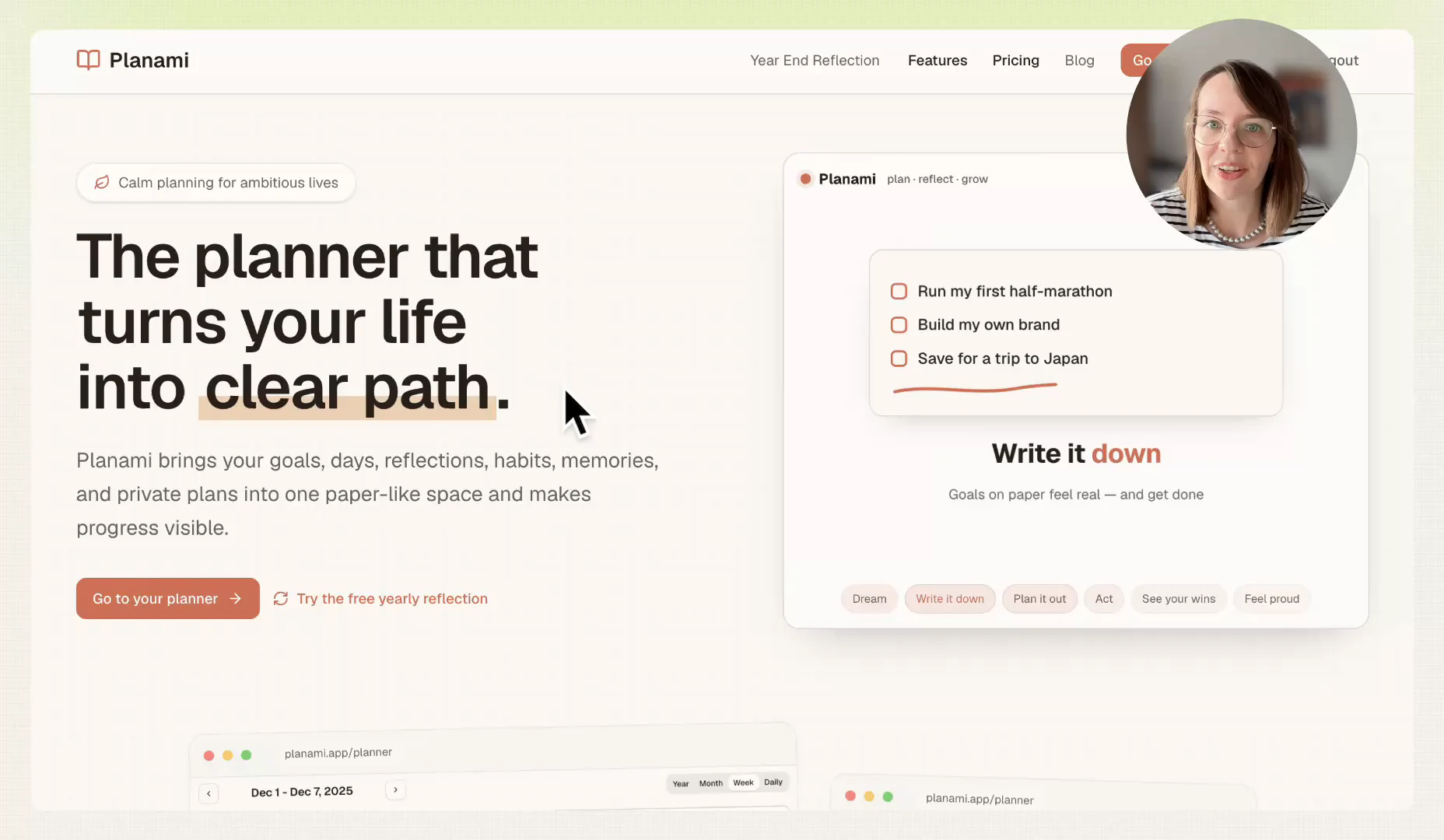
A raw test recording of a planner app, with a slow start and pauses while I typed. One prompt to Claude turned it into the version on the right.
- Padding
- doubled, from 19 to 38.
- Background
- Graphite swapped for Mist, a light one.
- Captions
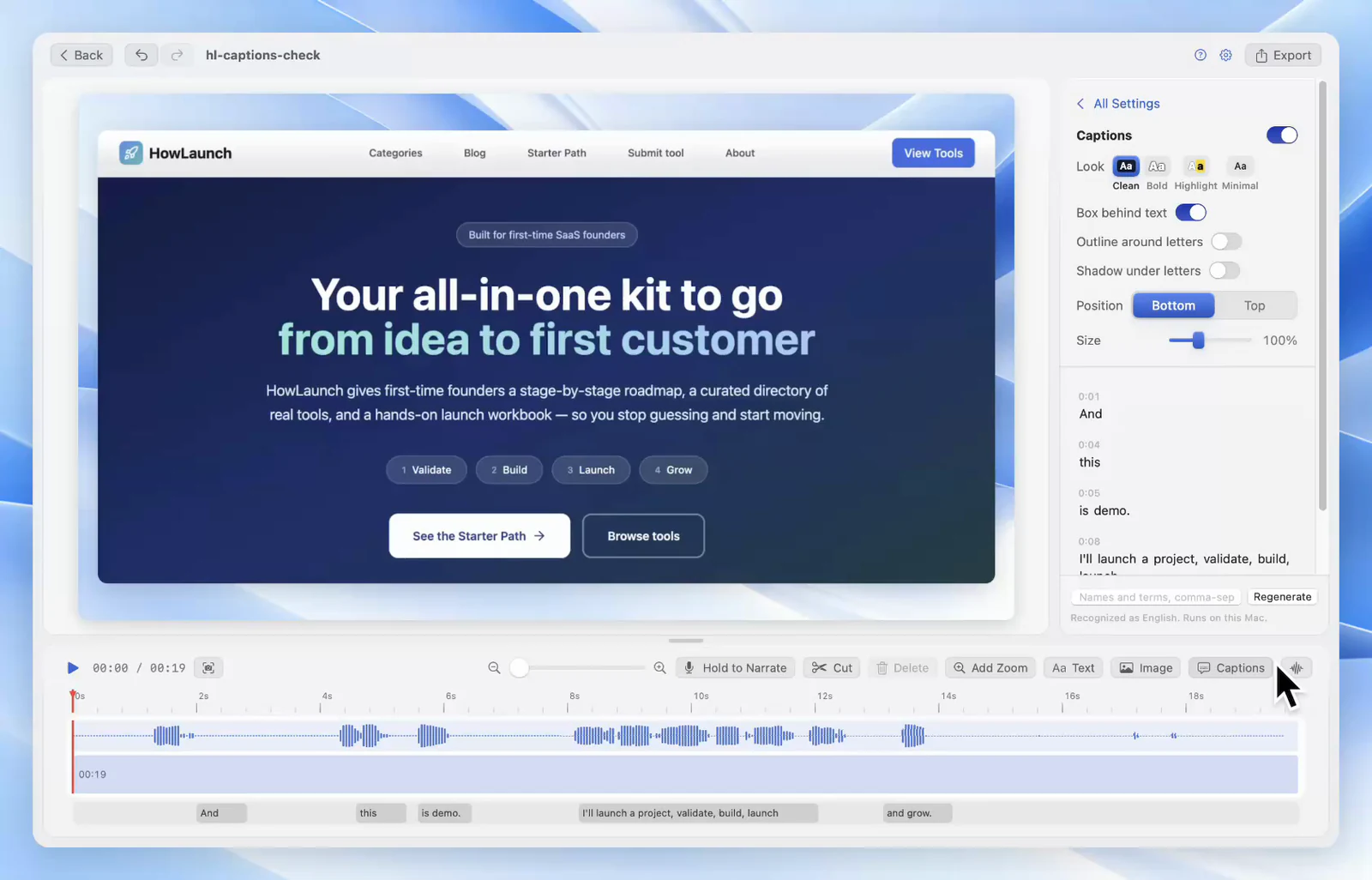
- transcribed and placed at the bottom in the default Clean style.
- Intro
- the first 10 seconds of desktop and "hi, testing my MCP" cut, so it opens on the product.
- Pauses
- five removed, 8.7 seconds in total, including two while typing.
- Zoom
- turned on for clicks, which gave three zooms that follow the cursor.
- Last line
- the camera goes full screen for "Now let's edit."
- Export
- checked the frames first, then exported at 1080p.
Fix the take instead of recording it again.
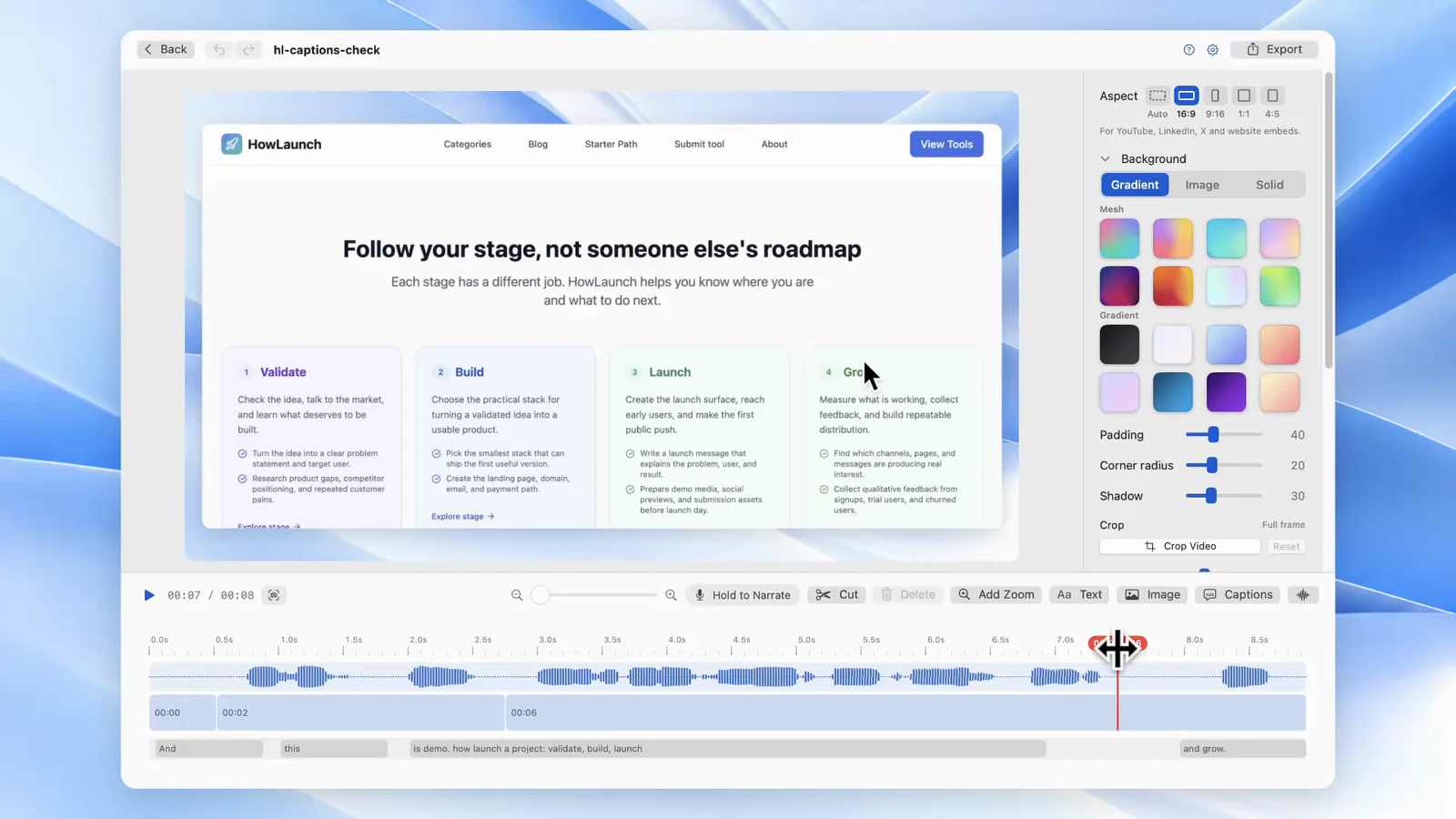
Cut the stumble on the timeline, or hold a key and say that one sentence again. Screen, camera and audio stay on separate tracks, so you fix one without touching the others.
Get it ready for where it is going.
Captions made on your Mac, zooms where the click happens, text on top, and any of five frame shapes from 16:9 to 4:5. Export an MP4 or a GIF.
From stop to export in one app.
The recording opens straight in the editor. Remove Pauses cuts every silence in one step, and export is one more click.
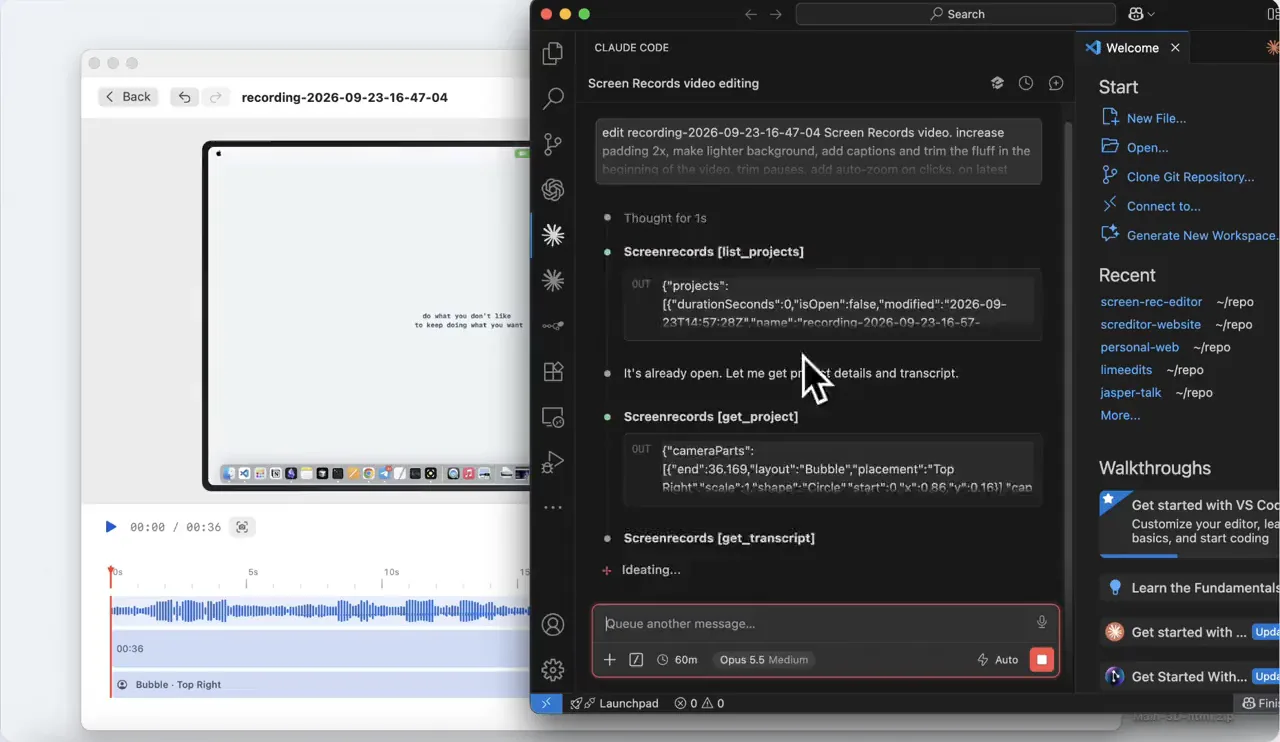
Your AI can work in the editor with you.
Connect Claude, ChatGPT, Codex or Cursor through MCP and ask for the edit in plain words. It cuts pauses, adds captions and zooms, and exports. Every change lands in the editor as one undo step, so you check it before anything is published.
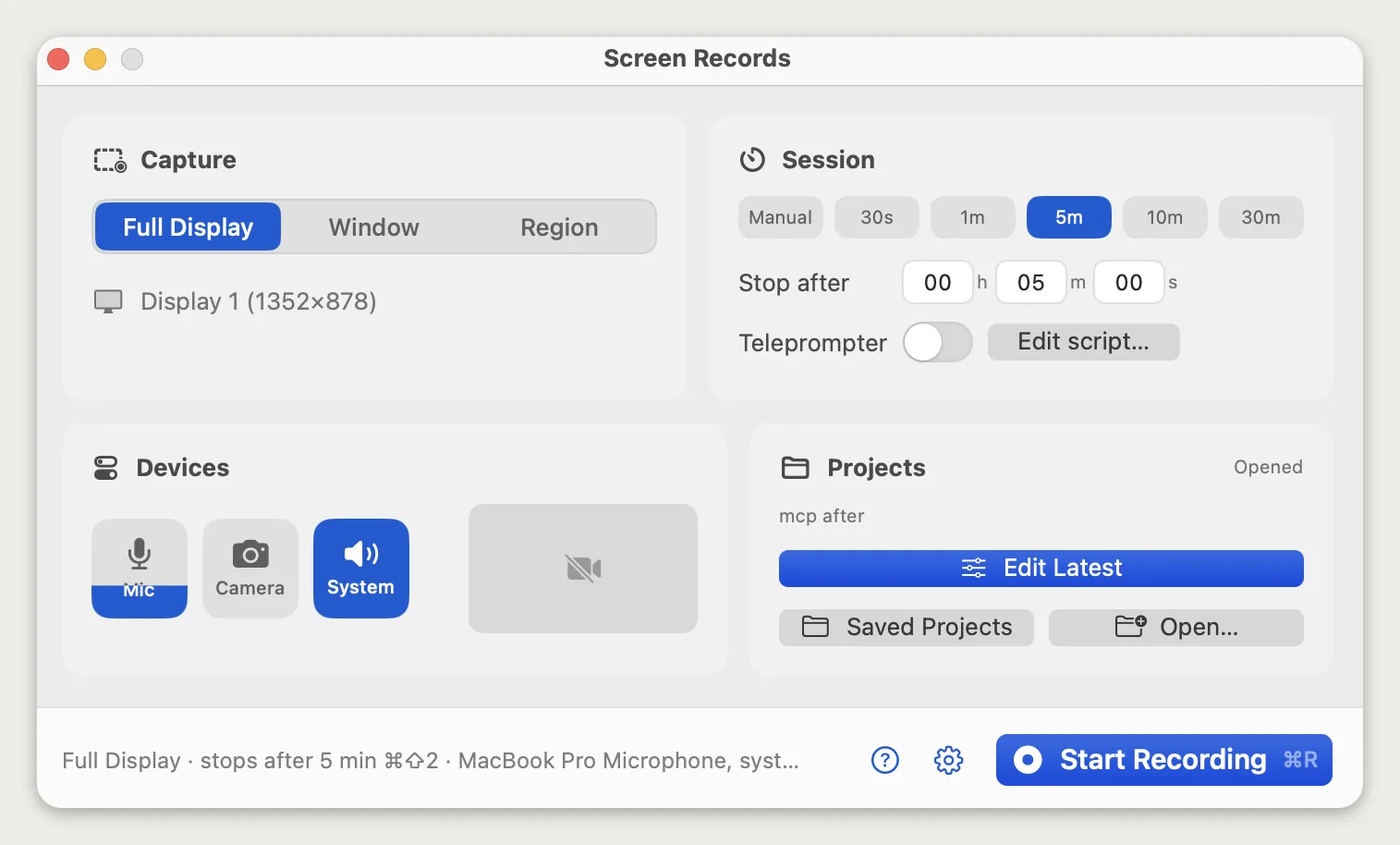
Everything you decide before recording, on one screen.
Capture area, session length, stop shortcut, devices and where the project saves. No wizard, no six-step modal. The status line tells you exactly what is about to be recorded — and warns you before macOS does.
What fits in 12.1 MB.
Native Swift, with no browser engine packed inside. Recorders with a similar feature set often pass 500 MB installed.
Record
- Full display, window or region
The region stays outlined on screen while you record.
- Controls on every Space
Pause or stop from a full-screen app or another display.
- Stop timer
Set a length and the recording ends on time, or stop with a global shortcut.
- Camera in any shape
Circle, rounded square, rectangle or full frame. Resize and move it after recording.
- Camera background blur
Runs on your Mac, live while you record.
- Mic, camera and system audio
Separate toggles, and headset mics work.
Edit
- Cut and split in two keys
Split at the playhead, select the dead air, delete.
- Remove Pauses
Cuts every silence longer than the gap you pick, in one click.
- Zooms with a depth choice
Place one where the click happens. The motion is eased.
- Push-to-talk voiceover
Re-record one sentence without redoing the take.
- Separate tracks
Screen, camera, mic, system audio and voiceover. Cut or mute one alone.
- Text and images on top
Titles, labels, logos or arrows over the video.
- Backgrounds
Image, gradient or solid color behind the recording.
- Non-destructive
Your raw capture is never overwritten, and every edit can be undone.
Captions & AI
- Captions made on your Mac
Transcribed locally. No audio is uploaded.
- Fix captions by typing
Edit a word like text. Muted audio is left out.
- Four caption styles
Restyle them before export.
- AI edits through MCP
Claude, ChatGPT, Codex or Cursor cut, zoom, caption and export a project.
- You review every AI edit
Each change lands in the open editor as one undo step.
Export
- MP4 in five shapes
Auto, 16:9, 9:16, 1:1 or 4:5, in H.264 that plays everywhere.
- GIF
A looping clip for a README, a changelog or a pull request.
- Audio on its own
Mic, system audio and voiceover, for the podcast version.
- Captions as files
SRT, WebVTT or plain text, or burned into the video.
- Quality you choose
See the file size and export time before you start.
Free to use. Pay once to drop the badge.
Record and edit as much as you like. Free exports carry a small screenrecords.app badge in a corner, and a lifetime license takes it off. No subscription, no export credits.
Free
The whole app, for as long as you like
No time limit
- Unlimited recordings
- Full editor: cut, zoom, captions, voiceover
- MP4 and GIF export with a small corner badge
- No account, no email required
No card, no account
One Mac
For your main machine
Lifetime license · 1 Mac
- No badge on video and GIF exports
- AI editing with Claude, ChatGPT, Codex or Cursor
- Full editor: cut, zoom, voiceover, backgrounds
- Editable captions, text and image layers
- MP4, GIF, audio, transcript and captions export
- Activate on 1 Mac
- Lifetime license — one payment, no subscription
- Lifetime updates included
14-day refund, no reason needed
Three Macs
Desktop, laptop, and one for your friend
Lifetime license · 3 Macs
- Everything in One Mac
- Activate on up to 3 Macs
- Move a seat by contacting support
- Lifetime license — one payment, no subscription
- Lifetime updates included
14-day refund, no reason needed
Prices in USD, one-time. Already bought it? Restore your license.
Your recordings stay yours.
Screen recordings capture whatever is on screen — customer data, dashboards, unreleased work. This app is built so none of that has to leave your Mac.
Signed and notarized
Apple-notarized builds, so macOS opens it without the right-click ritual.
Local-first projects
Recordings and projects live in a folder you choose, and captions are made on your Mac. Nothing is uploaded to us.
Non-destructive edits
Cuts, zooms and backgrounds are instructions. Your raw capture is never overwritten.
One payment
A lifetime license, not a subscription. Buy it once and it keeps working.
Before you download.
What do I get for free?
The whole recorder and editor, with no recording limit and no time limit. Video and GIF exports carry a small screenrecords.app badge in a corner. No account and no email address needed: download it and start.
Is this a subscription?
No. It is a one-time payment for a lifetime license: $29 for one Mac, $49 for three at the current price. The price steps up as licenses sell, and the pricing page shows the live count. Every future update is included, with no paid upgrades.
What does a license add?
Exports without the badge, and AI editing: Claude, ChatGPT, Codex or Cursor can cut, zoom and caption your project through MCP. The badge is added when you export, never saved into a project, so everything you made before buying exports clean too.
Can I move my license to a new Mac?
Yes. A one-Mac license activates on one machine at a time; email support and we will free the old seat. The three-Mac license covers a desktop, a laptop and a spare without asking.
Does it record system audio?
Yes — system audio, your microphone, and camera, each on its own track so you can adjust or export them separately.
Do my recordings go to a server?
No. Recording, editing and captions happen on your Mac. The app only talks to our backend to verify your license and check for updates. If you connect an AI client like Claude or ChatGPT, that client reads the transcript and any frames it asks for, and sends them to its own company.
How do captions work?
The app transcribes speech with a speech model that runs on your Mac. The model is a one-time 540 MB download, fetched the first time you make captions, and then used for every project. No audio leaves your Mac for it.
Does it have a dark mode?
Three themes come with the app: the lime one in the screenshots here, a plain light theme, and a full dark theme. Switch between them in settings at any point, including mid-project.
Which Macs are supported?
Apple Silicon and Intel Macs running macOS 14 or later. The download is a signed, notarized .dmg.
How big is the download?
5.3 MB to download, 12.1 MB once it is in your Applications folder. The app is written in Swift against Apple's own frameworks, so there is no browser engine packed inside it the way there is in an Electron build. Recorders with a comparable feature set often pass 500 MB installed.
Can I get a refund?
Yes — 14 days, no argument. The free version exists so you can find out first, but if it does not work for you, email us.
Still comparing recorders?
Side-by-side write-ups, including where another app is the better pick.
- The best Mac screen recorders in 2026An honest comparison of the Mac screen recording apps worth considering — what each is good at, what it costs, and when to pick which.
- Screen Records vs LoomA local one-time-purchase Mac recorder against a cloud subscription tool: where each one wins, and which fits your workflow.
- Screen Records vs Screen StudioScreen Studio 4.0 against Screen Records 0.1.5: automatic polish and share links on a subscription, or local editing, AI-assistant edits over MCP and a one-time license.
- The best Loom alternative for MacIf you used the link, pick another cloud tool. If you fought the 5-minute cap to make a video, pick a recorder with an editor. Options for each.
- A ScreenFlow alternative for people who use a fifth of itWhat ScreenFlow costs and does, why people switch, and which Mac alternative fits: a recorder with an editor, automatic polish, free tools or a pro NLE.
- Free screen recorders for Mac with no watermarkWhich Mac screen recorders are free with no watermark, which are trials or capped plans, and a 60-second test to run before you record a real take.

One bad sentence should not cost you the whole take.
Every Mac recorder I tried was either a 400 MB Electron brick or $15 a month for a trim button.
So I built Screen Records: 12.1 MB installed, with recording, editing and export in one native app.
Recently shipped
- · v0.1.7Free version instead of 3 trial videos
- · v0.1.5Sharper camera background blur and quicker caption fixes. Captions now skip audio you muted.
- · v0.1.4Claude, ChatGPT or Cursor can now edit a project for you, and captions are made on your Mac. GIF export and text over the video came with it.
Your next demo, ready to publish.
Download it free, record as much as you like, and pay once when you want the badge gone.