The best demo recording tool for solo builders
You are the whole production team, so the edit has to happen in the same window as the recording. Sorted by the four things solo builders actually record.
A local recorder with the editor built into it. That is the answer for almost every solo builder, and the reason has nothing to do with video quality.
It is that you are the entire production team. Nobody is going to take your raw take and cut it for you. So the tool that wins is the one where recording and editing are the same session, because any workflow with a handoff in the middle is a workflow you will abandon by week three. Solo builders do not stop making demos because the demos were bad. They stop because each one cost ninety minutes.
The rest of this is about which jobs that rule applies to, and the two where it does not.
Sort by the job, not by the tool
A team splits video work across people. You do not, so the useful question is which recordings you make repeatedly. For most one-person products it is four:
The launch demo. Sixty to ninety seconds, sits on the landing page and goes out on Product Hunt. You make maybe four a year and each one carries real weight.
The feature clip. Twenty to forty seconds of one new thing, for the changelog, an email, a post. This is the volume job, close to weekly, and it is the one that quietly stops happening.
The walkthrough. Five to fifteen minutes: onboarding, docs, an investor update. Monthly, long, and painful to redo, so recording it in sections matters more than anything else.
The reply. Thirty seconds showing a customer the thing they asked about, or reproducing a bug for yourself. Constant, disposable, gone by Friday.
The first three want a recorder with a timeline. The fourth does not, and pretending otherwise is how people end up paying for the wrong thing.
Where the timeline earns its place
For the launch demo, the feature clip and the walkthrough, three edits do almost all the work: cutting dead air, zooming on the detail, and fixing one sentence without reshooting.
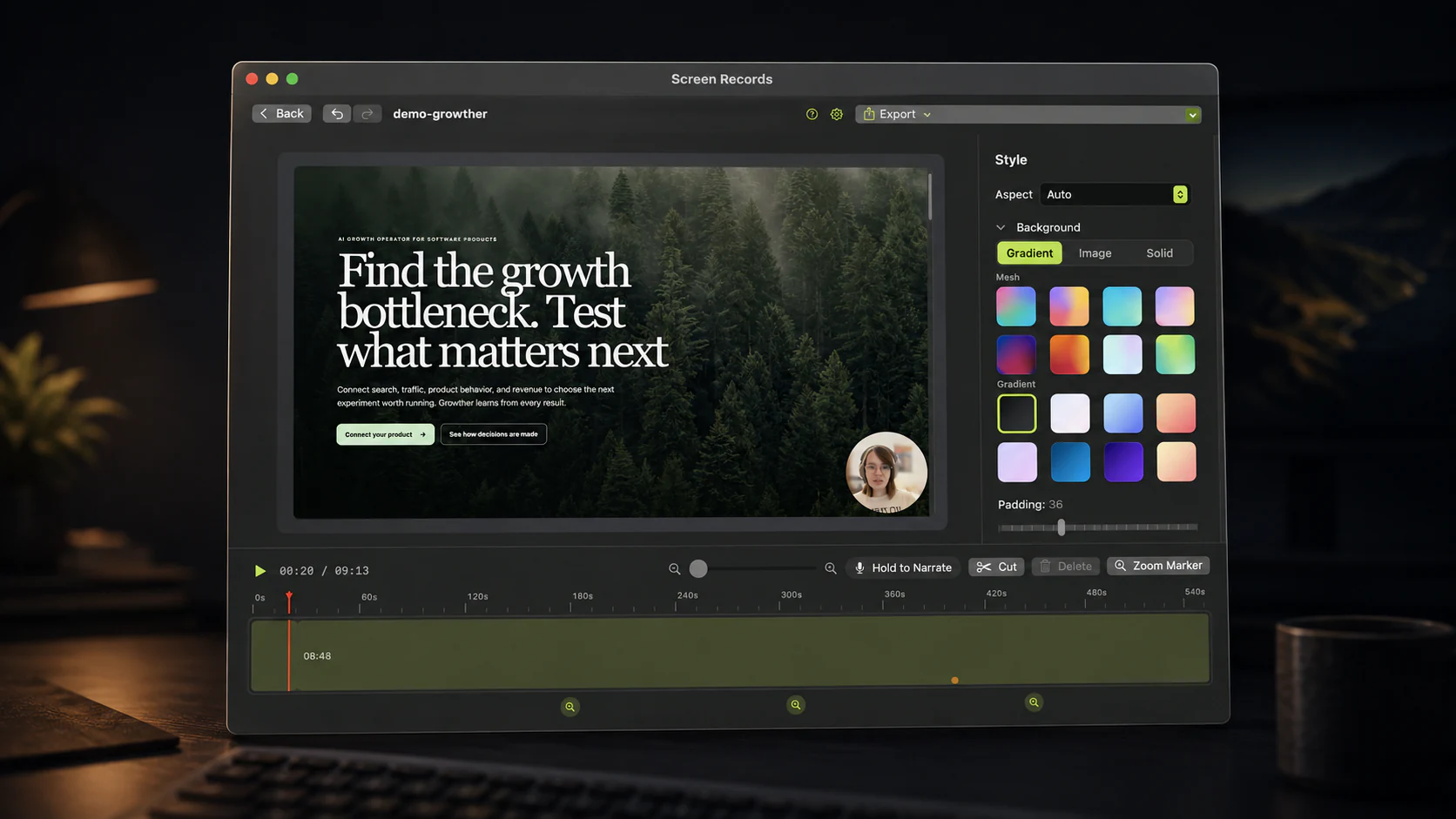
Cutting dead air is the big one. Removing the silences and the loading spinners takes 25 to 40 percent off a runtime and improves a demo more than any other change you can make. It is also the first thing dropped when editing means exporting a file, opening a second app, and finding the clip again.
Zoom is second. A solo builder's interface is usually dense, and the viewer is often on a phone. A zoom marker on the field you are talking about replaces a redesign you do not have time for.
Third is patching audio. You will fumble one sentence in every take. Re-recording that sentence as voiceover over the existing timeline costs fifteen seconds. Reshooting the screen costs the afternoon.
If those three are fast, you keep making videos. That is the entire selection criterion.
What that rules out
OBS Studio is free and better at live production than anything else, but it has no timeline. It records, and you edit somewhere else. For a weekly feature clip the setup cost is larger than the clip.
Final Cut, Premiere and Resolve are the right call when the recording is raw material for something produced, with music and motion graphics. Opening one of them to delete four seconds of silence is not a workflow, it is a hobby.
Cloud recorders are a genuine fit for exactly one of the four jobs, and I will come back to that. As a default they cost you three things: a subscription that runs while you are not recording, your screen sitting on somebody else's servers at a moment when it is full of customer data, and a back catalogue that stops being yours when you stop paying. For a bootstrapped product, the third one is the one that bites.
The two places we are the wrong answer
The reply. Someone asks a question in Slack and wants thirty seconds of screen. Use the macOS screenshot toolbar, shift-command-5. It is already installed, it records a region, and the clip is disposable. Do not open an editor for something nobody will watch twice.
When the link is the product. Cloud tools do one thing no local app can: you stop recording and a shareable URL already exists, with view counts and comments attached. If your support workflow lives or dies on that, pay for it. We looked at the trade in detail in Screen Records vs Loom.
Also not us: streaming, multi-camera production, a team video library with analytics, and Windows. Screen Records is a macOS app for people making things worth publishing.
Then the money, which for a solo builder is your money
Screen Records is $29 for one Mac and $49 for three, paid once. Before that it is free with the full editor and no account, so you can find out whether it fits before telling us your email address. Free exports carry a small badge in a corner, and the license removes it.
The comparison that matters is structural rather than the sticker. A subscription video tool in the $12 to $15 a month range costs more in its first year than a one-time license does forever, and it keeps charging in the months where you ship code and record nothing. Solo budgets are personal budgets, and the tool you use forty times a year should not be a recurring line item.
Prices move, ours included, so check before you decide.
The fifteen minutes that make it stick
The real problem for one person is not tooling, it is decision fatigue at the moment you want to record. Spend fifteen minutes once and stop deciding:
- Make a demo account with real-looking data in it. Empty states are the top reason a working product looks broken on video, and the second reason is a real account full of customer names.
- Pick one capture region and keep it. Same size every time means your clips look like a set instead of a pile.
- Set the font sizes up now. Editor at 16 to 18pt, browser at 125 percent. Absurd on your monitor, correct on a phone.
- Decide the camera default once. Small circle, bottom right, background blurred, or off. Either is fine. Choosing weekly is not.
- Bind a stop shortcut and turn on Do Not Disturb before you start, every time, until it is muscle memory.
After that a feature clip is four minutes end to end, and four minutes is cheap enough that you will actually keep doing it.
The one-question version
Will anyone watch this more than once?
No: shift-command-5, and move on with your day. Yes: record it somewhere the editing happens in the same window, because the edit is what makes it watchable and a slow edit is an edit that never happens.
Screen Records is built for the second answer. Free to use with the full editor and no account, macOS 14 or later.
Everything above reflects these tools as of September 2026, checked against their own documentation. Screen Records is ours, so weigh the recommendation accordingly. If something here is wrong, tell us and we will correct it.
Share this post
Keep reading
- ComparisonQuickTime screen recording: what it can and cannot doQuickTime is free and already installed. Here is exactly where it stops — system audio, zoom, trimming — and what to do about it.
- ComparisonScreen Records vs Screen StudioScreen Studio 4.0 against Screen Records 0.1.5: automatic polish and share links on a subscription, or local editing, AI-assistant edits over MCP and a one-time license.
- GuideHow to record a YouTube tutorial on your MacPick the query, make the screen readable, record in sections, and edit in four moves. Setup and export settings for screen tutorials people finish.