Screen Records vs Loom
A local one-time-purchase Mac recorder against a cloud subscription tool: where each one wins, and which fits your workflow.
Updated October 7, 2026
These two tools look similar in a feature list and behave nothing alike in practice. One produces a link; the other produces a file. Almost every real difference follows from that.
Here is an honest read on both, written by the people who make one of them, so check the claims about the other against their own docs before you decide. Loom's plans and features below were read off its pricing page on October 7, 2026. Screen Records is described as of version 0.1.5, released September 24, 2026.
The core difference
Loom-style cloud recorders upload as you record. You stop, and a URL exists. Viewers watch in a browser, leave comments, and you can see who finished it. The recording lives on their infrastructure.
Screen Records records to your Mac. You stop, and a project opens in the editor. You cut it, zoom it, narrate it, caption it, export an MP4, a GIF, an audio M4A or a subtitle file, and use it however you need.
Neither is better in the abstract. They are optimised for different moments.
Where a cloud tool wins
- Time to share. Nothing beats a link that exists the instant you stop talking.
- Viewer analytics. Who watched, how far they got, where they dropped. Genuinely useful for sales and onboarding.
- Comments on the timeline. Async review works well when feedback attaches to 1:42.
- Cross-platform teams. Browser playback works everywhere, including the phone your customer is holding.
- Nothing to install. For a company rolling something out to fifty people, that matters.
- AI on the hosted video. Loom's Business + AI plan writes titles, summaries and chapters, and lets you edit by transcript with filler words and silences removed.
If your recordings are conversations with colleagues, a cloud tool is probably the right choice and this post should not talk you out of it.
Where a local editor wins
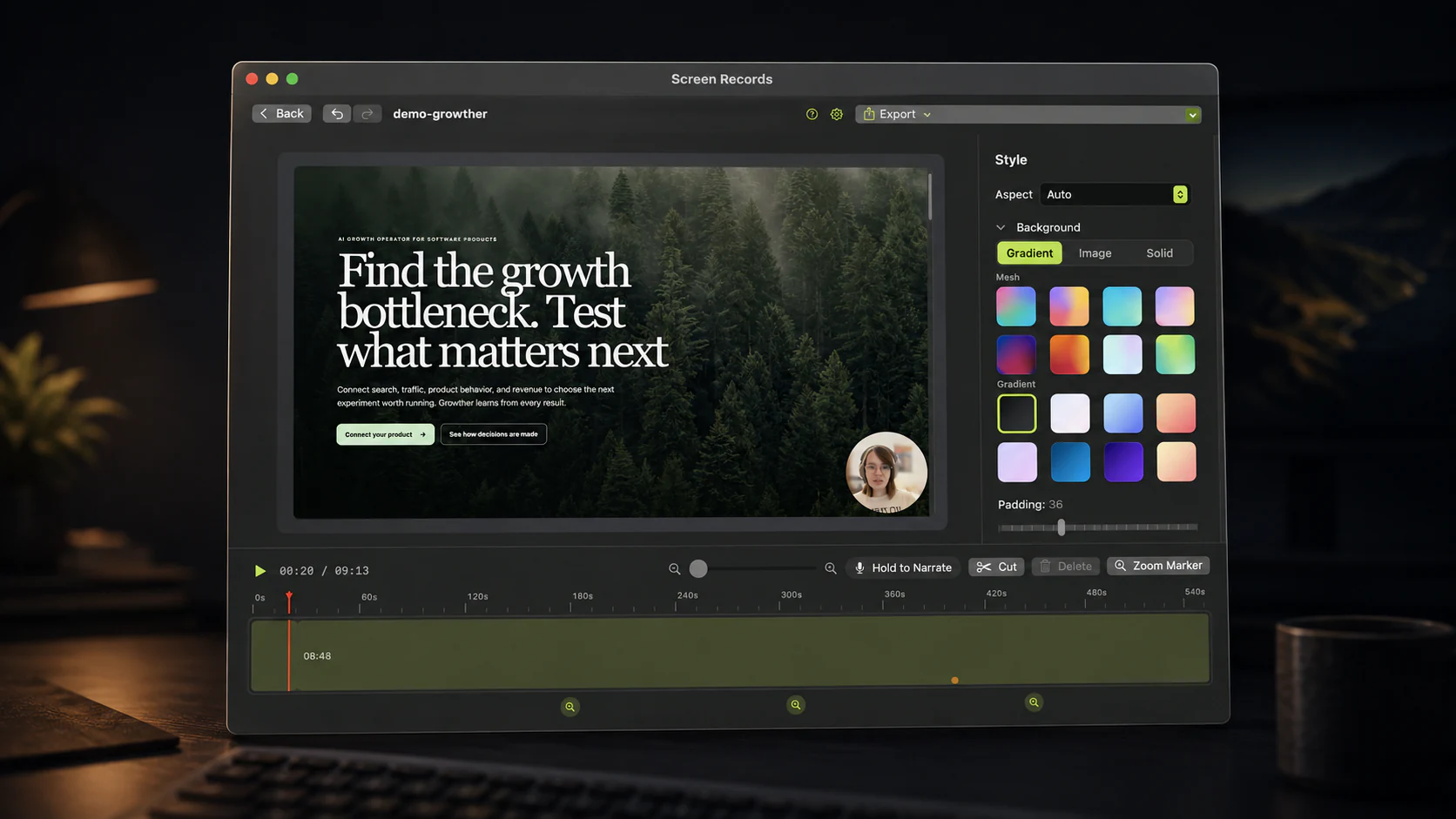
- Editing depth. Cut mid-recording, place zoom markers, re-record a single sentence of narration over the timeline, put a background behind the frame, add text and image layers, and switch the camera from full screen to a bubble partway through. Loom's editor trims and stitches, and edits by transcript on its AI plan.
- Captions made on your Mac. A Whisper model transcribes the recording locally. Fix words by typing, pick one of 4 styles, burn them in or export SRT, WebVTT or text. Remove Pauses cuts every silence over a length you choose in one pass, with no AI plan required.
- An AI assistant can do the edit. The built-in MCP server lets Claude, ChatGPT, Codex or Cursor open a project, cut it, zoom it, caption it and export it, while you watch the changes land in the editor. More on the MCP page.
- Nothing leaves your Mac. Screen recordings show whatever is on screen: customer records, internal dashboards, unreleased features. Local-only removes an entire class of question from your security review.
- System audio, properly. Mic, system audio and voiceover as separate tracks. Mute a stretch of one without touching the others, and export them individually.
- You keep the file. An MP4 or GIF goes into a course platform, an email, a Notion page, a README, a YouTube upload. A link only goes where links go. On Loom, downloading your own videos starts at the Business plan.
- It keeps working. Stop paying a subscription and the editor locks. A one-time license does not have an off switch.
Cost over three years
Loom's free Starter plan caps you at 25 videos of 5 minutes each. Business, which removes the caps and adds trimming and downloads, is $18 per user per month, or about $15 billed annually. Business + AI, with transcript editing and filler and silence removal, is $24, or about $20 annually. One seat on Business comes to $180–$216 a year.
Screen Records is $29 once for one Mac, $49 once for three, at the current launch price. Over three years that is $29 against $540–$648 for one person on Loom Business.
That comparison is only fair if you actually want what the subscription adds. Hosting, analytics and a team library are real products rather than padding. If you never look at view counts, you are renting infrastructure you do not use.
The privacy question
This one is not about price. When you record a screen with a customer's account open, a cloud recorder means that footage now sits on a third party's servers, subject to their retention and access policies. Many teams are fine with that; some cannot be.
Screen Records never uploads a recording, and captions are transcribed on your Mac, so your audio stays there too. The app talks to our backend for two things: verifying your license and checking for updates. The first time you ask for captions, it also downloads the speech model once from Hugging Face. Details are in the privacy policy, which is short on purpose.
Use both, honestly
Plenty of people should. A cloud tool for the daily async messages nobody rewatches, and a local editor for the demo on your pricing page, the onboarding video, the course module: the recordings that will be watched a hundred times and deserve the extra ten minutes.
Try before you decide
It is free to use with the full editor and no account; free exports carry a small badge in a corner. Download it and record the thing you would otherwise have made in Loom. If the export is not better, you have lost ten minutes.
Share this comparison
Keep reading
- ComparisonFree screen recorders for Mac with no watermarkWhich Mac screen recorders are free with no watermark, which are trials or capped plans, and a 60-second test to run before you record a real take.
- ComparisonA ScreenFlow alternative for people who use a fifth of itWhat ScreenFlow costs and does, why people switch, and which Mac alternative fits: a recorder with an editor, automatic polish, free tools or a pro NLE.
- Product updateI let Claude Code edit my screen recordingOne prompt, 48 seconds: a 36-second raw take came back cut to 17, with captions, zooms and a lighter background. What it did and what it sent to the AI.